It watches the door and counts the visitors.
Arduino
The brain
Loading part…
count events from a sensor
Count visitors with a button; store the total in a variable.
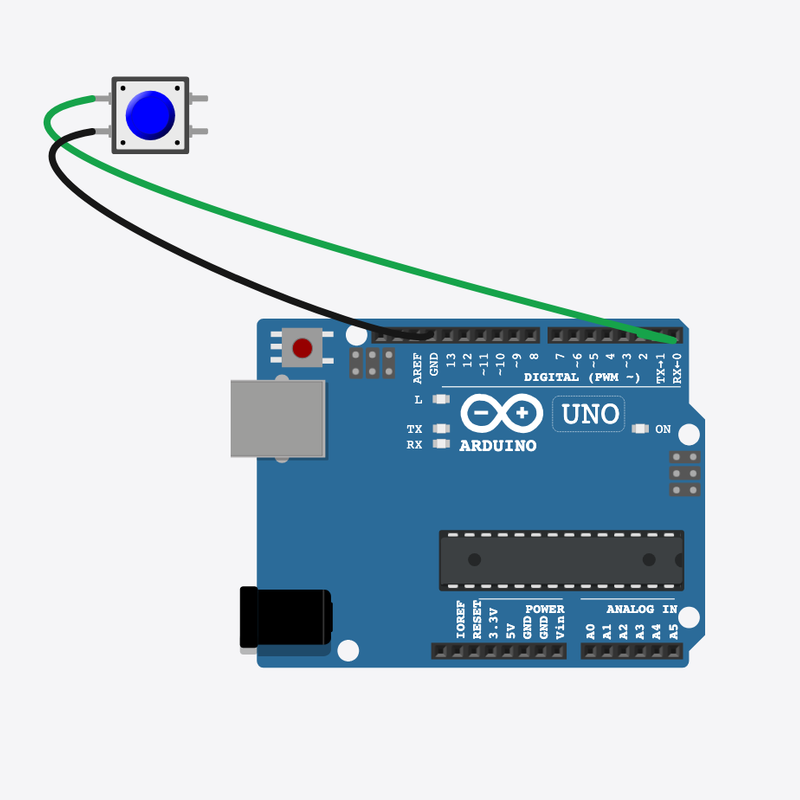
Pin connections
| Part 1 | Part 2 | |
|---|---|---|
Pushbutton pin 1 | → | Arduino pin 2 |
Pushbutton pin 2 | → | Arduino GND |
Count every visitor!
Each button press adds 1 to the count — just like a clicker at a shop door.
Shops count how many people come in, and museums count daily visitors the same way.
The problem
We need a total that only goes up when someone new arrives.
Think of it like
It's like clicking a counter every time someone walks through the door.
It watches the door and counts the visitors.
Arduino
The brain
Did someone arrive?
The button stands in for a door sensor — a press means one visitor.
if (digitalRead(SENSOR_PIN) == LOW)
Add one visitor
++ is a short way to write visitors = visitors + 1 — same thing, shorter.
visitors++;
Show the day's total
Show the total, wait for the button to let go, then watch for the next visitor.
Serial.print("Visitors today: ");
Serial.println(visitors);
Then loop back to step 1
Follow these steps in order. Match the wires to the colors shown.
Place Arduino
Place the Arduino (uno) on the breadboard.
Arduino placed — ready to count visitors!
The visitor box
const int SENSOR_PIN = 2;
int visitors = 0;
visitors starts at 0 and only goes up — it remembers everyone who arrived today.
Get the sensor ready
  pinMode(SENSOR_PIN, INPUT_PULLUP);
  Serial.begin(9600);
  Serial.println("Visitor counter ready");
}
void loop() {
Pin 2 is set to listen — ready to catch each new visitor.
Add one on arrival
    visitors++;
    Serial.print("Visitors today: ");
    Serial.println(visitors);
    while (digitalRead(SENSOR_PIN) == LOW) {
      delay(30);
    }
    delay(200);
  }
  delay(20);
}
Press → visitors++ → show the total → wait for release → loop() again.
const int SENSOR_PIN = 2;
int visitors = 0;
void setup() {
  pinMode(SENSOR_PIN, INPUT_PULLUP);
  Serial.begin(9600);
  Serial.println("Visitor counter ready");
}
void loop() {
  if (digitalRead(SENSOR_PIN) == LOW) {
    visitors++;
    Serial.print("Visitors today: ");
    Serial.println(visitors);
    while (digitalRead(SENSOR_PIN) == LOW) {
      delay(30);
    }
    delay(200);
  }
  delay(20);
}
Q1. What is a variable?
Q2. What does visitors++ do?
Start with 5 visitors already — change int visitors = 0 to int visitors = 5.
Hint: Line 2.
Make the loop rest a little longer — change delay(20) to delay(40) at the very end of loop().
Hint: Line 18, the last line of loop().
A line-by-line tour of the sketch — the same steps as in Robot Gurukul Studio.
Program overview
Big idea
Every Arduino program has a top part, a setup() part that runs once, and a loop() part that runs again and again.
In this project
Each button press counts one visitor, and the screen shows the total for the day.
Tip
Read from the top to the bottom. Tap any word or line if you need help!
const int SENSOR_PIN = 2;
int visitors = 0;
setup()
Big idea
setup() runs one time when the board turns on.
In this project
It gets the sensor button on pin 2 ready and opens the message screen.
Why here
Things we do only once go inside setup().
void setup() {
  pinMode(SENSOR_PIN, INPUT_PULLUP);
  Serial.begin(9600);
  Serial.println("Visitor counter ready");
}
loop()
Big idea
loop() runs again and again, forever.
In this project
This is where we watch for a visitor and add one to the count.
Why here
Things that repeat go inside loop().
void loop() {
  if (digitalRead(SENSOR_PIN) == LOW) {
    visitors++;
    Serial.print("Visitors today: ");
    Serial.println(visitors);
    while (digitalRead(SENSOR_PIN) == LOW) {
      delay(30);
    }
    delay(200);
  }
  delay(20);
}
Try this: Change a number inside loop(), then press Run to see what happens.
pinMode
Big idea
pinMode tells a pin if it will listen or push power out.
In this project
It sets pin 2 to listen for the sensor button.
Why here
It goes in setup() because we only set it once.
pinMode(SENSOR_PIN, INPUT_PULLUP);
digitalRead
Big idea
digitalRead checks if a pin is ON or OFF.
In this project
It checks if someone has pressed the sensor button.
Why here
It goes in loop() so we can react the moment a visitor arrives.
if (digitalRead(SENSOR_PIN) == LOW) {delay
Big idea
delay means wait. Nothing else happens while it waits.
In this project
A tiny wait helps the button read cleanly.
Why here
Right after we check the button.
delay(30);
begin
Big idea
Serial.begin opens a message screen so the board can talk to the computer.
In this project
It lets us print the visitor count.
Why here
It goes in setup() once, before we print anything.
Serial.begin(9600);
Big idea
Serial.print writes words or a number on the screen and stays on the same line.
In this project
It writes "Visitors today: " right before the number.
Why here
In loop() so we can see each new total.
Serial.print("Visitors today: ");println
Big idea
Serial.println writes on the screen and then jumps to a new line.
In this project
It prints a friendly hello when the board turns on.
Why here
So each message gets its own line.
Serial.println("Visitor counter ready");