It picks a random number and shows it.
Arduino
The brain
Loading part…
random() triggered by a button
Roll a random number 1–6 on a 7-segment display when you press a button.
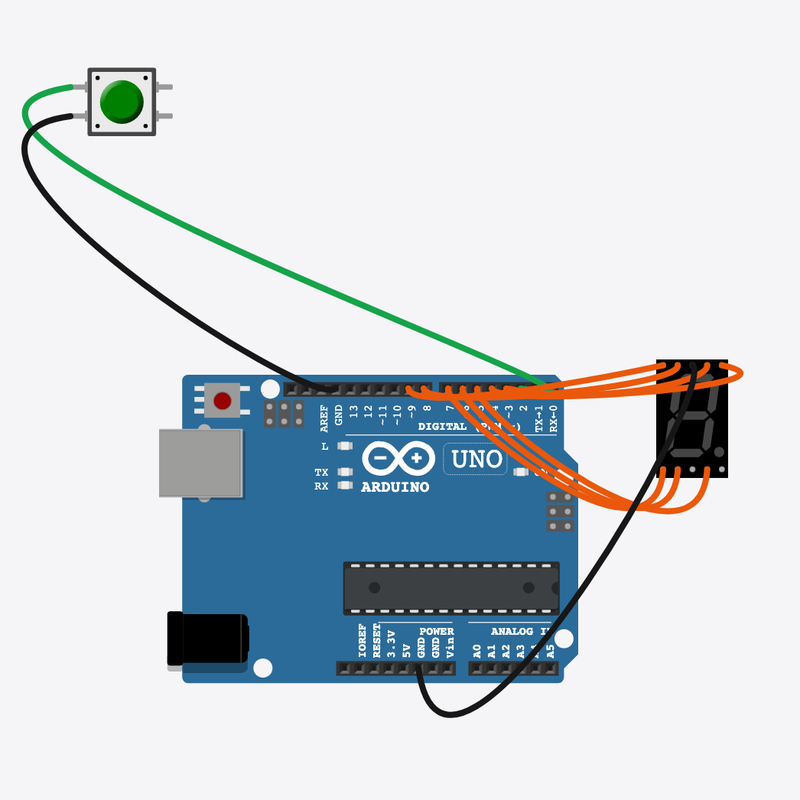
Pin connections
| Part 1 | Part 2 | |
|---|---|---|
Arduino pin 2 | → | Roll button pin 1 |
Roll button pin 2 | → | Arduino GND |
Arduino pin 3 | → | 7-segment display seg A |
Arduino pin 4 | → | 7-segment display seg B |
Arduino pin 5 | → | 7-segment display seg C |
Arduino pin 6 | → | 7-segment display seg D |
Arduino pin 7 | → | 7-segment display seg E |
Arduino pin 8 | → | 7-segment display seg F |
Arduino pin 9 | → | 7-segment display seg G |
7-segment display COM | → | Arduino GND |
Let's roll a dice with code!
Press the button and a surprise number 1 to 6 pops up — just like a real die.
Board games and game apps use random numbers so you can never guess what comes next.
The problem
We want a new surprise number every time, not the same number again and again.
Think of it like
Like shaking a real die — you can never tell what face will land up.
It picks a random number and shows it.
Arduino
The brain
Press it to roll a new number.
Roll button
The roll button
It lights up little bars to show a number 1 to 6.
7-segment display
The number screen
Wait for a press
We only roll when you press the button.
if (digitalRead(BUTTON_PIN) == LOW)
Pick a surprise number
random(1, 7) gives a number from 1 to 6 — perfect for a die.
int roll = random(1, 7);
Light up the number
showDigit turns the right bars on and off to draw your number.
showDigit(roll);
Then loop back to step 1
Follow these steps in order. Match the wires to the colors shown.
Place Arduino
Place the Arduino (uno) on the breadboard.
Arduino placed — ready to build!
Place Roll button
Place the Roll button (btn1) on the breadboard.
Place 7-segment display
Place the 7-segment display (seg1) on the breadboard.
Connect Arduino pin 2 to Roll button (btn1) 1.l
Connect Arduino pin 2 to Roll button (btn1) 1.l.
Connect Roll button (btn1) 2.l to Arduino GND
Connect Roll button (btn1) 2.l to Arduino GND.
Connect Arduino pin 3 to 7-segment display (seg1) anode (+)
Connect Arduino pin 3 to 7-segment display (seg1) anode (+).
Connect Arduino pin 4 to 7-segment display (seg1) B
Connect Arduino pin 4 to 7-segment display (seg1) B.
Connect Arduino pin 5 to 7-segment display (seg1) cathode (-)
Connect Arduino pin 5 to 7-segment display (seg1) cathode (-).
Connect Arduino pin 6 to 7-segment display (seg1) D
Connect Arduino pin 6 to 7-segment display (seg1) D.
Connect Arduino pin 7 to 7-segment display (seg1) E
Connect Arduino pin 7 to 7-segment display (seg1) E.
Connect Arduino pin 8 to 7-segment display (seg1) F
Connect Arduino pin 8 to 7-segment display (seg1) F.
Connect Arduino pin 9 to 7-segment display (seg1) G
Connect Arduino pin 9 to 7-segment display (seg1) G.
Connect 7-segment display (seg1) COM.2 to Arduino GND
Connect 7-segment display (seg1) COM.2 to Arduino GND.
Number shapes
const uint8_t DIGITS[7] = {
  0b0000000,
  0b0000110,
  0b1011011,
  0b1001111,
  0b1100110,
  0b1101101,
  0b1111101,
};
Each number has a pattern that says which bars turn on to draw it.
showDigit()
void showDigit(int digit) {
  uint8_t pattern = DIGITS[digit];
  for (int seg = 0; seg < 7; seg++) {
    digitalWrite(SEG_A + seg, (pattern >> seg) & 1);
  }
}
It steps through the bars and turns each one on or off from the pattern.
Roll on a press
void loop() {
  if (digitalRead(BUTTON_PIN) == LOW) {
    int roll = random(1, 7);
    showDigit(roll);
    while (digitalRead(BUTTON_PIN) == LOW) {
      delay(10);
    }
    delay(200);
  }
  delay(20);
}
The button picks a random number, then showDigit() shows it until your next roll.
const int BUTTON_PIN = 2;
const int SEG_A = 3;
const uint8_t DIGITS[7] = {
  0b0000000,
  0b0000110,
  0b1011011,
  0b1001111,
  0b1100110,
  0b1101101,
  0b1111101,
};
void showDigit(int digit) {
  uint8_t pattern = DIGITS[digit];
  for (int seg = 0; seg < 7; seg++) {
    digitalWrite(SEG_A + seg, (pattern >> seg) & 1);
  }
}
void setup() {
  pinMode(BUTTON_PIN, INPUT_PULLUP);
  for (int i = 0; i < 7; i++) {
    pinMode(SEG_A + i, OUTPUT);
  }
  showDigit(1);
  randomSeed(analogRead(0));
}
void loop() {
  if (digitalRead(BUTTON_PIN) == LOW) {
    int roll = random(1, 7);
    showDigit(roll);
    while (digitalRead(BUTTON_PIN) == LOW) {
      delay(10);
    }
    delay(200);
  }
  delay(20);
}
Q1. Where does work that repeats go?
Q2. What numbers can random(1, 7) give?
Add a note (comment) on the randomSeed line that says it makes different rolls each run.
Hint: That's line 24 in setup().
Hold the number longer — change delay(200) to delay(400).
Hint: That's line 33 in loop().
A line-by-line tour of the sketch — the same steps as in Robot Gurukul Studio.
Program overview
Big idea
Every Arduino program has a top part, a setup() part that runs once, and a loop() part that runs again and again.
In this project
Press the button and a number from 1 to 6 shows up, just like rolling a die.
Tip
Read from the top to the bottom. Tap any word or line if you need help!
const int BUTTON_PIN = 2;
const int SEG_A = 3;
const uint8_t DIGITS[7] = {
  0b0000000,
  0b0000110,
  0b1011011,
  0b1001111,
  0b1100110,
  0b1101101,
  0b1111101,
};
void showDigit(int digit) {
  uint8_t pattern = DIGITS[digit];
  for (int seg = 0; seg < 7; seg++) {
    digitalWrite(SEG_A + seg, (pattern >> seg) & 1);
  }
}
setup()
Big idea
setup() runs one time when the board turns on.
In this project
It gets the button and the number display ready, shows a 1, and mixes up the randomness.
Why here
Things we do only once go inside setup().
void setup() {
  pinMode(BUTTON_PIN, INPUT_PULLUP);
  for (int i = 0; i < 7; i++) {
    pinMode(SEG_A + i, OUTPUT);
  }
  showDigit(1);
  randomSeed(analogRead(0));
}
loop()
Big idea
loop() runs again and again, forever.
In this project
It waits for a button press, then rolls a new number.
Why here
Things that repeat go inside loop().
void loop() {
  if (digitalRead(BUTTON_PIN) == LOW) {
    int roll = random(1, 7);
    showDigit(roll);
    while (digitalRead(BUTTON_PIN) == LOW) {
      delay(10);
    }
    delay(200);
  }
  delay(20);
}
Try this: Change a number inside loop(), then press Run to see what happens.
pinMode
Big idea
pinMode tells a pin if it will listen or push power out.
In this project
It sets the button pin to listen and the display pins to push power out.
Why here
It goes in setup() because we only set it once.
pinMode(BUTTON_PIN, INPUT_PULLUP);
digitalWrite
Big idea
digitalWrite turns a pin ON or OFF.
In this project
It turns each little bar of the display on or off to draw the number.
Why here
It is used inside showDigit() to paint the number.
digitalWrite(SEG_A + seg, (pattern >> seg) & 1);
digitalRead
Big idea
digitalRead checks if a pin is ON or OFF.
In this project
It checks if you pressed the roll button.
Why here
It goes in loop() so we can react to your press.
if (digitalRead(BUTTON_PIN) == LOW) {analogRead
Big idea
analogRead reads a number from a pin, from 0 up to 1023.
In this project
It reads a wiggly number from an empty pin to mix up the randomness.
Why here
In setup() so the rolls are different each time.
randomSeed(analogRead(0));
delay
Big idea
delay means wait. Nothing else happens while it waits.
In this project
A short wait holds the rolled number for a moment.
Why here
Right after a roll, before checking the button again.
delay(10);
random
Big idea
random picks a surprise number for you.
In this project
It picks a number from 1 to 6 — your dice roll.
Why here
In loop() when you press the button.
int roll = random(1, 7);